Stay ahead of the game

Sign up for our newsletter to receive the latest digital marketing strategies and insights for the month ahead, delivered straight to your inbox!

    Microsoft Ads Policy Checklist: Keep Your Campaigns Running

    Ad PlatformsMicrosoft Ads

    Success in Microsoft Advertising requires more than clever copy and precise targeting. The key to long-term performance lies in adhering to the Microsoft Ads policy. When advertisers neglect policy standards, they risk ad disapproval or even Bing Ads account suspension.

    This comprehensive checklist helps you maintain Microsoft Advertising compliance across every part of your campaign – from ad creation and tracking to landing-page setup.

    BTW, you can also access a free compliance scanner here:
    Adcore Microsoft Ads Policy CheckerIt’s designed to help you identify potential violations before your campaigns go live.

    Don’t have a Microsoft Ads account yet?

    Go to the Microsoft Advertising website: https://about.ads.microsoft.com/

    Click on “Sign up now” or a similar button. You can sign up using a Microsoft account (like a Hotmail or Outlook account) or create a new one. Follow the prompts to fill in your business information, contact details, and billing information.

    Important Tip!
    Due to recent security updates, make sure you have access to your business documents for authentication and verification.

    Compliance isn’t a one-time task, it’s the foundation for campaigns that perform consistently and never face Bing Ads account suspension.

    Why Microsoft Ads Policy Matters

    The Microsoft Ads policy outlines what content, products, and landing experiences are acceptable across Microsoft’s ad network. Violating these rules can lead to account flags, reduced ad visibility, or even permanent suspension.

    Complying with Microsoft’s advertising standards:

    • Prevents Bing Ads account suspension.

    • Ensures your ads deliver consistent impressions and clicks.

    • Protects your brand reputation.

    • Improves ROI by avoiding wasted spend on disapproved ads.

    When you follow Microsoft’s guidelines, you strengthen account trust and maintain uninterrupted campaign performance.

    microsoft ads meme

    Microsoft Ads Policy Checklist

    Follow these steps before launching or editing any campaign:

    ✅ Pre-Launch Audit

    • Review all official Microsoft Ads policy documents.

    • Verify your landing page displays the advertised product prominently.

    • Confirm your ad copy is transparent, accurate, and policy-safe.

    • Install UET tracking correctly with user consent (if applicable).

    • Double-check eligibility for restricted verticals (gambling, health, etc.).

    ✅ During Campaign Launch

    • Launch with a test budget to monitor approval and performance.

    • Check the “Disapproved Ads” tab daily for issues.

    • Keep close watch on any warnings or notifications in your account dashboard.

    ✅ Ongoing Maintenance

    • Refresh ad creative regularly to prevent ad fatigue.

    • Revisit policy updates at least every quarter.

    • Monitor CTR and conversion rates alongside compliance status.

    • Resolve small disapprovals quickly before they escalate.

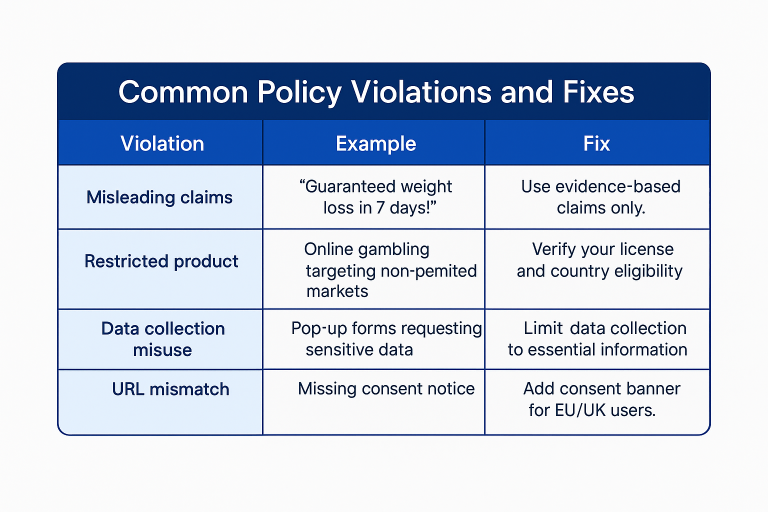
    microsoft ads common policy violations

    Key Areas of the Microsoft Ads Policy

    1. Ad Copy and Creative Standards

    Your ad copy must be truthful and aligned with your offer.

    • Avoid misleading or exaggerated claims.

    • Use proper capitalization and grammar.

    • Match your display URL with the actual landing page.

    • Include clear, verifiable benefits instead of unverifiable promises.

    Microsoft reviews ads for accuracy and transparency. Even small inconsistencies between ad text and landing pages can lead to disapproval.

    2. Landing Page and Offer Requirements

    Your landing page is the foundation of compliance.

    • The product or service must be clearly displayed.

    • Landing pages should not exist solely to collect user data.

    • Ensure all links function properly and lead to the expected content.

    • Add a clear privacy policy and contact information.

    An untrustworthy or misleading landing page can jeopardize your Microsoft Advertising compliance status.

    3. Restricted and Disallowed Content

    Microsoft maintains a strict list of restricted categories.

    • Gambling, adult content, and political advertising face heavy restrictions.

    • Health or financial claims require certification or verification.

    • Products that make unrealistic claims are disallowed.

    Before you promote in sensitive categories, check Microsoft’s regional policy guidelines.

    4. Account Behaviour and Enforcement

    Repeated violations trigger escalation.

    • Microsoft applies warnings, temporary restrictions, and full Bing Ads account suspension for persistent offenders.

    • A single egregious violation can lead to immediate account termination.

    • Your compliance history influences future approvals and ad reviews.

    Keep your account in good standing by reviewing policy updates quarterly.

    5. Privacy, Tracking, and Data Collection

    To remain compliant with privacy standards:

    • Implement consent banners in EEA/UK regions.

    • Configure Microsoft’s Universal Event Tracking (UET) tag correctly.

    • Avoid storing personal data without explicit consent.

    • Update your privacy policy when adding tracking or remarketing tools.

    This ensures your campaigns meet Microsoft Advertising compliance across global markets.

    Using Tools to Simplify Compliance

    Manual reviews can be tedious. That’s where free tools like Adcore’s Microsoft Ads Policy Checker come in. It quickly scans your ads and landing pages for red flags related to the Microsoft Ads policy.

    You can try the free checker here: Adcore Microsoft Ads Policy Checker.

    It analyzes your content for policy alignment, saving you from future disapprovals or Bing Ads account suspension.

    To minimize risk:

    1. Maintain transparent communication with Microsoft support.

    2. Monitor all accounts under your MCC to ensure they follow policy.

    3. Address warnings promptly.

    4. Keep accurate billing information and avoid creating duplicate accounts.

    Once an account is suspended, recovery is challenging. Staying compliant from the start is far easier than appealing after the fact.


    Pro Tips for Lasting Compliance

    • Bookmark Microsoft’s Advertising Policies Center.

    • Schedule monthly self-audits for ad creative and landing pages.

    • Use region-specific targeting only in markets where your content is allowed.

    • Implement Microsoft’s verification process for sensitive categories.

    • Record your compliance checks for accountability in case of disputes.


    Internal and External Resources

    Share this article
    Back to top