


Share


Verify and Claim Your Website URL in Google Merchant
These are the steps you need to take in order to verify and claim your website URL in Google Merchant
Before you can start using certain programs in Google Merchant Center, you need to verify and claim your store’s website URL. Verification lets Google know that you are an authorized owner of a website URL. Claiming your website URL associates the verified website URL with your Google Merchant Center account.
Step 1: Enter your website URL
1. Sign in to your Merchant Center account.
2. From the settings menu, find Tools
3. Select Business information under “Tools.”
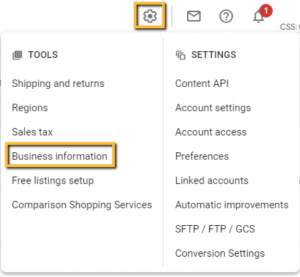
4. Click the Website tab.
5. Enter the URL for your online store, starting with:
http:// or https://
Use a domain that you own and maintain.
6. Click Save.
Step 2: Verify your website URL
To verify your website, you can use one of four methods. Each of these options allows Google to verify that you are the owner and that you have edit access to your website.
Google Analytics
If you’re already using Google Analytics and are an administrator of your account, this could be an easy way to verify your website URL. The Google Analytics tracking code is used only to verify your website URL ownership. No Google Analytics data will be accessed.
1. Ensure that you have set up the Analytics tag. If so, you will find the tag in the head section of your page. Learn how to set up the Analytics tag.
2. Click the blue Verify URL button at the bottom right to submit your URL to Google Search Console for verification.
Once you submit your URL, you’ll receive a confirmation email from Google Search Console.


Trending Articles
Get exclusive CMO tips that I only share with email subscribers.

Don't forget to share this article!


 Back to top